

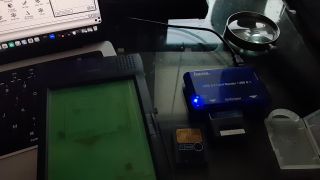
Hey all, did some tinkering tonight, sharing the basics of what I
uncovered before I hit the hay and wake up from this wonderful fever
dream. I plan to make a video to demonstrate this hopefully soon.
I plan to play with PCMCIA to SD cards (not micro this time like I did
in my last video) as I think that would be easy to load up, play on a
Newton, and then unmount and stick in a laptop's fairly common SD card
slot. And back and forth you go. I ordered the PCMCIA to SD and SD
cards of a good size for this. Matthias originally asked about the SD
cards and I realized that would be a great common media to use.
For now I am playing with a PCMCIA to **Smart Card** adaptor. Remember
those things? The wafer thin cards that looked like one inch floppy
disks?
But with those I've been able to go back and forth between Einstein and
Newton now completely with Terminal commands on the Mac, no GUI Disk
Utility. (In my last video I used both.)
Commands you want to use...
diskutil list
--To figure out the indentifier, the external card reader, or perhaps a
SD card in the SD card slot. For these examples below it was "Disk5"
/dev/disk5 (external, physical):
#: TYPE NAME SIZE IDENTIFIER
0: *16.4 MB
disk5
diskutil eraseDisk JHFS+ Newt /dev/disk5
--To erase and prep the card
Simply put, we have the command, JHFS+ is the format, "Newt" is the name
of the card as a placeholder, it won't be that for long. And /dev/disk5"
is the target disk.
diskutil unmountDisk /dev/disk5
--To unmount the card so you can write to it.
sudo dd if=/Applications/Einstein\ Folder/ata5mbpod.ata of=/dev/disk5
--Writing to the "Disk5" device, in this case was a smart card. The meat
of this is "sudo dd if=" then you drag your file from the file list into
terminal and it will put in the path and file name. (I love that
feature) After that add the "of=/deve/disk5". Hit enter, it asks for a
system password to make sure you haven't gone out of your mind, and then
you are on your way.
diskutil eject /dev/disk5
--To eject the card once done writing. It is the polite thing to do to
the poor card you are working so hard.
[[ Over on the Newton side if all went well, once you have the newly
written ATA card, you'll see what image you put on that card. Save
stuff to the card, make sure to unmount it, and then you eventually go
back to the Einstein computer and plug that card back in "disk5". ]]
sudo dd if=/dev/disk5 of=/Applications/Einstein\ Folder/ata5mbpod.ata
bs=6K conv=noerror,sync
--This is perhaps the most complex of the commands and the last one.
As you can see, it is looking at "disk5". The destination is
creating the image "ata5mbpod.ata"
"bs=6K" Block Size, should be a 6 mb image. It read the whole 16
mb card I was using anyway. Maybe we can fine tune this part to be
more exact? Or maybe we will be copying the size of whatever card we
are using.
Conv=noerror,sync = Tell dd to continue operation, ignoring all
read errors. Before adding this option Einstein didn't recognize the
image. Earlier Disk Utilities had the option to make it "read/write"
and later utilities simply have it as a "raw image". Couldn't find a
way to specify that in my searching, but adding this option helped
Einstein work with the image that the terminal "sudo dd" would create.
Once you have these commands in terminal you can simply scroll
through them using the up or down arrow keys.
I had "disk5" write over "ata5mbpod.ata". And then "ata5mbpod.ata"
when changed by Einstein would update the image being sent back to "disk5".
You'll need to restart Einstein to get it to notice the changes to
the ATA card image that you already mapped as a card image, but that you
continue to change from "disk5". Good news is, you don't need to
relink the card image every time it is updated.
Those are the basics. Hope to play with 8 and 16 mb SD cards
soon, and to perfect the process of exchanging information between
Einstein and Newton with a interchangable SD card and a few terminal
commands you saw above.
Keep the green folks!
Greg / Doc Clu
 Marisa Giancarla
Terminal commands to read and write ATA card images for Newton/Einstein
4 views
Uploaded by:
Marisa Giancarla
•
Category:
Newton
•
Added on
16 October 2026
Description
Hey all, did some tinkering tonight, sharing the basics of what I
uncovered before I hit the hay and wake up from this wonderful fever
dream. I plan to make a video to demonstrate this hopefully soon.
I plan to play with PCMCIA to SD cards (not micro this time like I did
in my last video) as I...
uncovered before I hit the hay and wake up from this wonderful fever
dream. I plan to make a video to demonstrate this hopefully soon.
I plan to play with PCMCIA to SD cards (not micro this time like I did
in my last video) as I...